Canon Powershot SD430 Instrukcja Konfiguracji Strona 83
- Strona / 130
- Spis treści
- ROZWIĄZYWANIE PROBLEMÓW
- BOOKMARKI

- Software & Wireless Guide 1
- North America 2
- Other Regions 2
- READ CAREFULLY BEFORE USING 3
- Table of contents 5
- Using the PDF Manuals 6
- Read This First 7
- Like a Pro 8
- Print the images 9
- Send images to the computer 10
- Software 12
- Edit a Movie 13
- Extract Stills from Movies 13
- System Requirements 14
- Windows Programs 15
- Macintosh Programs 15
- Precautions when Connecting 16
- Platform – Preparations 17
- Windows XP 18
- 5 Click [Next] 19
- Platform – The Basics 23
- 2 Download the images 24
- Direct Transfer menu 25
- Memory Card Reader Connection 26
- Printing Images 28
- 4 Click [3. Print] 29
- Layout Print 30
- The ZoomBrowser EX Windows 34
- Task Area 35
- Folders Area 35
- Browser Area 35
- Display Mode 36
- Display Control Panel 37
- Function Buttons 37
- Viewer Window 38
- Properties Window 39
- ZoomBrowser EX Features 40
- Internet 42
- Replaying Movies 43
- Editing Movies 44
- Instructions 45
- Assist mode 45
- Camera Settings 46
- The My Camera Window Features 47
- 2 Download images 54
- [Preferences] 56
- 5 Click [Print] 59
- Layout Print Window Features 60
- The ImageBrowser Windows 61
- Explorer Panel 62
- Control Panel 64
- File Information Window 66
- ImageBrowser Features 67
- Functions Selected from Menus 68
- Starting PhotoStitch 72
- The My Camera Window 74
- Add an Original Sound File 77
- Computer and Camera 78
- Operating System Environment 79
- Existing Network 80
- Wireless LAN Router 80
- Checklist 81
- Power Button 82
- Playback 82
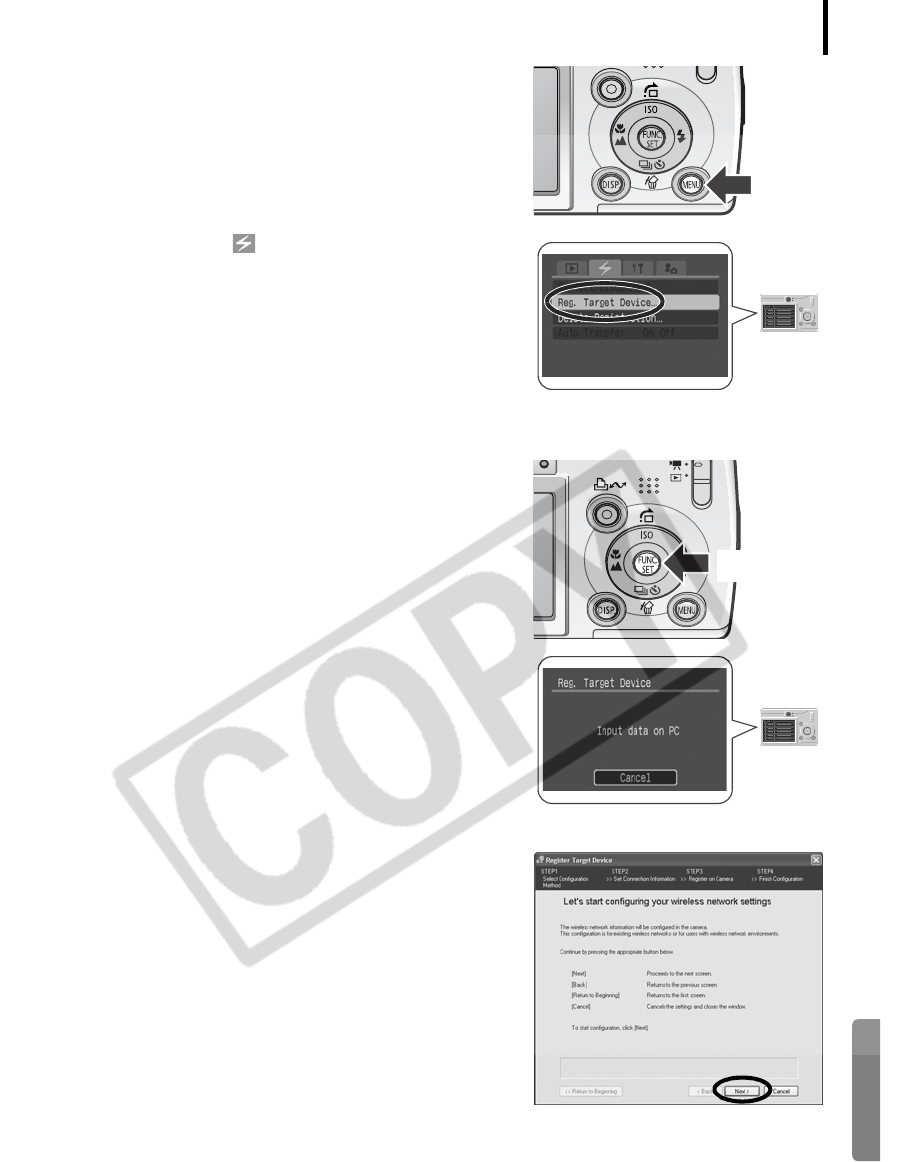
- 4 Press the camera's M 83
- 6 Press the F 83
- 7 Click [Next] 83
- Connecting 89
- 4 Press the button (or F 90
- Disconnecting 91
- Deleting a Target Device 92
- Commands (Direct Transfer) 94
- 2 Press the F 95
- 3 Press the F 96
- 5 Click [Settings] 98
- 7 Click [Finish] 98
- Preparing for Remote Shooting 99
- RemoteCapture Task Window 100
- Remote Shooting 101
- 3 Click the [Release] button 101
- 2 Press the camera's M 102
- 4 Select [On] and press the M 102
- 5 Shoot the image 103
- Connection Difficulty 104
- Check the 105
- Firewalls 109
- Before Contacting Us 110
- Appendices 111
- ZoomBrowser EX 112
- ImageBrowser 112
- Uninstalling the Software 113
- Memory Card Folder Structure 116
- Troubleshooting 118
- Windows XP and Windows 2000 120
- Windows Me/Windows 98 SE 123
- Information about Your Camera 127
Powiązane produkty i podręczniki dla Oprogramowanie Canon Powershot SD430
 (106 strony)
(22 strony)
(156 strony)
(140 strony)
(37 strony)
(106 strony)
(139 strony)
(106 strony)
(22 strony)
(156 strony)
(140 strony)
(37 strony)
(106 strony)
(139 strony)
© 2020, manymanuals.pl. Wszelkie prawa zastrzeżone. | 0.035 s |
 Manymanuals.com
 Manymanuals.de
 Manymanuals.fr
 Manymanuals.it
 Manymanuals.pl
 Manymanuals.cz
 Manymanuals.es
 Manymanuals-pt.com
Komentarze do niniejszej Instrukcji